You log in to the NUPCO SRM supplier portal. The tender list loads. You click a tender to open the item list. Nothing happens. Or the frame goes blank. Or the Terms and Conditions page refuses to render, so you can't accept it, so you can't submit. Deadline is Thursday. Nine times out of ten this is not your account, not your network, and not a NUPCO outage. It's a Google Chrome change from 2023 that quietly broke a whole generation of SAP portal applications, and it takes about two minutes to work around.
The fix, in short
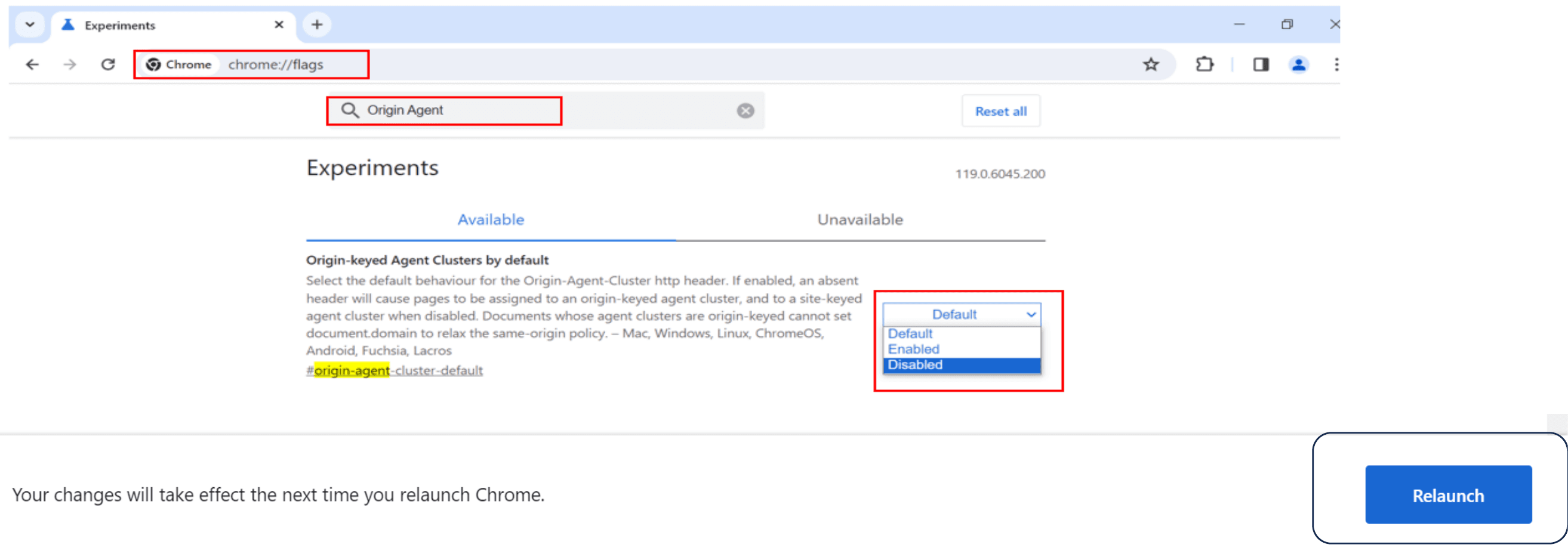
Open Chrome and go to chrome://flags/. Search for Origin Agent. Set Origin-keyed Agent Clusters by default to Disabled. Click Relaunch.
If you don't see that flag in your version of Chrome, skip ahead to the section When the flag isn't there. Newer Chrome builds removed it and need a registry setting instead.
What actually breaks
SAP SRM, the engine behind NUPCO's tender workflow, is a classic SAP NetWeaver Portal application. The screen you see is not one page. It's a shell page with several nested frames inside it, and those frames talk to each other constantly: the navigation tree tells the content frame what to load, the content frame tells the toolbar which buttons to enable, the document viewer reports back when a download completes.
For twenty years, those frames coordinated using a browser feature called document.domain. Two pages served from different hostnames under the same parent domain could each set document.domain to the shared parent and, from that moment, treat each other as same-origin, free to call each other's functions and read each other's state.
Chrome 115 turned that off. Microsoft Edge followed in versions 118/119.
The result inside SRM is silent, partial breakage, which is exactly why it's so confusing. Open a tender's item list, and the click does nothing or you get an empty frame. Try to download tender item attachments, and the download never starts or opens a blank tab. Open Terms and Conditions, and the page doesn't render, so you can't tick accept. Click Save, Submit or Approve, and the button is dead or spins forever. Navigate between tabs in the tender, and the navigation tree highlights but the content never changes.
No error message. No red banner. Just buttons that don't do anything. That is why so many suppliers assume the portal is down and lose a day waiting for it to come back.
Why Chrome did this
The technical name is origin-keyed agent clusters.
Chrome used to group pages by site (nupco.com), so anything under that site shared a browser process and could, with document.domain, reach into each other. Chrome now groups by origin (the full https://srm.nupco.com), which is a stronger isolation boundary: it limits the blast radius of a compromised page and enables per-origin memory protections.
It's a genuine security improvement. It just happens to be incompatible with how SAP NetWeaver Portal was built. SAP documents the fallout in SAP KBA 3369675 — Enterprise Portal inner application navigation issues with Google Chrome Version starting 115/116 & Edge Version starting 118/119, and it first surfaced back with Chrome 106 in SAP Note 3157754.
The Chrome flag below reverts your browser to the old site-keyed behaviour, which restores document.domain, which makes SRM work again.
The fix, step by step
Step 1 — Open Chrome's experiments page. Open Google Chrome. Click into the address bar, type chrome://flags/ and press Enter. Type it directly into the address bar. This page isn't reachable from the normal Settings menu, and searching Google for chrome flags will not get you there.
Step 2 — Find the Origin Agent flag. In the Search flags box at the top, type Origin Agent. One result should appear: Origin-keyed Agent Clusters by default, with the internal name #origin-agent-cluster-default highlighted underneath it.
Step 3 — Set it to Disabled. On the right of that entry there's a drop-down showing Default. Open it and choose Disabled. Disabled is the setting you want. Not Default, not Enabled. Reading the flag's own description makes the logic clear: Documents whose agent clusters are origin-keyed cannot set document.domain. You are switching origin-keying off so SAP's frames can talk again.
Step 4 — Relaunch Chrome. A blue Relaunch button appears at the bottom of the window, next to the message Your changes will take effect the next time you relaunch Chrome. Click it. Chrome closes and reopens with your tabs restored. Save any work in other tabs first. A half-typed form in another window may not survive the restart.
Step 5 — Log back in and verify. Open the NUPCO SRM portal and sign in again. Then check the three things that were broken. Open a tender and click through to the item list. The items should load. Click a tender item to download its documents. The download should start. Open the Terms and Conditions page. It should render, and the accept control should be clickable.
If all three work, you're done. This setting persists; you won't need to repeat it after every restart.
The screenshots below show the address bar in step 1 and the flag itself in steps 3 and 4.

When the flag isn't there
Chrome flags are temporary by design, and this one has been retired from newer builds. If you search chrome://flags/ for Origin Agent and get no results, the flag is gone from your version and you need the enterprise policy instead. It does the same thing, more permanently, and it survives Chrome updates.
On Windows, the setting lives in the registry. You need local administrator rights, and if your machine is domain-managed, your IT team should push this by Group Policy rather than having each user edit their own registry.
For Google Chrome, the key is HKEY_LOCAL_MACHINE\SOFTWARE\Policies\Google\Chrome, the value name is OriginAgentClusterDefaultEnabled, the type is REG_DWORD, and the value is 0.
For Microsoft Edge, same problem and same fix, because Edge shares Chrome's engine. The key is HKEY_LOCAL_MACHINE\SOFTWARE\Policies\Microsoft\Edge, with the same value name OriginAgentClusterDefaultEnabled, the same REG_DWORD type, and the same value of 0.
Applied from an elevated Command Prompt, Chrome's version is: reg add "HKLM\SOFTWARE\Policies\Google\Chrome" /v OriginAgentClusterDefaultEnabled /t REG_DWORD /d 0 /f
Close Chrome completely and reopen it. To confirm the policy took effect, go to chrome://policy (or edge://policy) and look for OriginAgentClusterDefaultEnabled with a value of false and a status of OK. If it isn't listed, click Reload policies on that page first.
For a fleet, deliver it as a Group Policy preference or an Intune configuration profile using the official Chrome ADMX templates. The policy appears under Google Chrome as Origin-keyed Agent Clusters by default, set to Disabled.
While you're in there: two settings that help with tender downloads
Fixing the frames fixes navigation. Two more Chrome defaults commonly get in the way of the actual download step, and both are worth allowing only for the SRM host.
Pop-ups. SAP SRM opens tender documents and the T&C view in new browser windows. Chrome blocks those by default and shows only a small blocked-popup icon at the right edge of the address bar. Go to Settings, then Privacy and security, then Site settings, then Pop-ups and redirects, click Add next to Allowed to send pop-ups and use redirects, and enter the SRM portal address.
Multiple automatic downloads. A tender with several attachments triggers a batch of downloads; Chrome permits the first and silently blocks the rest. Under Site settings, then Additional content settings, then Automatic downloads, add the same SRM address to the allowed list.
Add the SRM hostname specifically. Don't switch either of these on globally. Pop-up blocking is doing real work on the rest of the web.
Is disabling this setting safe?
It's a trade-off worth understanding rather than a plain yes or no.
Turning the flag off returns Chrome to site-keyed agent clusters, the behaviour that was the web's default for its entire history until 2023, and the behaviour every other browser used alongside it. You are not disabling the same-origin policy, sandboxing, HTTPS checking, or any of Chrome's actual security barriers. You are giving up one additional layer of process isolation between subdomains of the same site.
Two things are worth weighing. It applies browser-wide, not just to NUPCO: every site you visit in that browser loses the extra isolation, and neither the flag nor the policy can be scoped to a single domain. And it's a workaround with a shelf life: Chrome removed the flag from newer builds and the underlying policy is a compatibility bridge, not a permanent contract. Plan on the real fix landing server-side.
A pragmatic middle ground, if you'd rather not change your everyday browser: keep the setting in one browser and use it only for SRM. Configure Edge for tender work and leave Chrome untouched, or the other way around.
The permanent fix belongs on the server
Everything above is the supplier-side workaround. The durable fix is a one-line change on the portal, and NUPCO's SAP Basis team is the party that can make it: send the Origin-Agent-Cluster: ?0 response header from the SRM portal's responses.
That header tells Chrome, per response, that this specific application wants the old site-keyed grouping. No browser flag, no registry key, no instructions for thousands of suppliers, and no loss of isolation for any other site those suppliers visit. SAP KBA 3369675 covers this alongside the kernel patches for affected NetWeaver releases.
If you're on the NUPCO side and reading this because your helpdesk queue is full of the tender page won't open: the header is the fix. Everything in this post is what your suppliers have to do until it ships.
Quick troubleshooting
No results when searching Origin Agent in chrome://flags/? The flag is retired in your Chrome version. Use the registry policy described above.
Set it to Disabled and it's still broken? Confirm you clicked Relaunch; chrome://flags changes do nothing until Chrome restarts.
Worked yesterday, broken today? A Chrome update may have dropped the flag. Re-check chrome://flags/, then apply the policy.
chrome://policy doesn't list the policy? Wrong hive (HKLM, not HKCU), a typo in the value name, or Chrome wasn't fully closed. Click Reload policies.
Fixed in Chrome, still broken in Edge? Edge needs its own registry key under Policies\Microsoft\Edge.
Item list opens but downloads don't start? Allow pop-ups and automatic downloads for the SRM host.
Still stuck? Note the tender number, the exact screen, and your Chrome version from chrome://version, then contact the NUPCO helpdesk. Those three details save a round trip.
One habit worth keeping
Whatever else you do, don't discover this on the afternoon a bid closes. Open the tender, walk to the item list, and open the Terms and Conditions page the day you're notified, not the day you submit. A dead button is a two-minute browser setting when you find it early, and a missed tender when you find it late.
Sources and further reading
Chrome disables modifying document.domain — Chrome for Developers: https://developer.chrome.com/blog/document-domain-setter-deprecation
Origin-keyed agent clusters — Chrome Platform Status: https://chromestatus.com/feature/5683766104162304
SAP KBA 3369675 — Enterprise Portal inner application navigation issues with Google Chrome starting 115/116 & Edge starting 118/119: https://userapps.support.sap.com/sap/support/knowledge/en/3369675
Kernel patch for SAP Note 3157754 re: Origin-Agent-Cluster and Chrome v106: https://answers.sap.com/questions/13715203/kernel-patch-for-note-3157754-re-origin-agent-clus.html
SAP Enterprise Portal inner application navigation issues starting from Edge 119 — Microsoft Q&A: https://learn.microsoft.com/en-us/answers/questions/5508637/sap-enterprise-portal-inner-application-navigation
OriginAgentClusterDefaultEnabled policy reference — Chrome Enterprise: https://chromeenterprise.google/policies/#OriginAgentClusterDefaultEnabled
A browser setting gets you into the tender. ProcDuck makes sure you knew about it in the first place, alerting you the moment a NUPCO tender matches your product catalog, so you open the item list days before the deadline rather than on the afternoon it closes. Start your free trial and see your next NUPCO match.
Book a demo