Features
Packing levels: price per test, kit, vial or carton
Price lab reagents and other products per test, kit, vial, box or carton: enter the packing once and ProcDuck converts it to each tender line's unit.
A lab reagent is packed in layers: a carton holds kits, a kit holds vials, and a vial holds a number of tests. A tender line asks for just one of those layers, written as a short unit code such as EA, KIT, VIA or TET. When your price list is per kit and the line is per test, someone has to divide, and one wrong division prices the whole line wrong.
Packing levels take that arithmetic away. You describe how the product is packed once, you state your one cost and one sale price for the level you know, and ProcDuck works out the price for every other level and for the unit of each tender line. A saved bid price keeps its shape: it is still SAR per the tender's own unit, with four decimals.
EA, TET, KIT and VIA stand for and why the same material code can change unit from one tender to the next: How to price lab reagents per test, vial or kit on a NUPCO tender.At a glance: one price for every unit
Take a reagent sold in cartons of 10 kits, with 4 vials in a kit and 100 tests in a vial. The price you know is SAR 2,000 per kit. This is what ProcDuck shows for that same price at every level:
| Level | What it holds | Price (SAR) |
|---|---|---|
| Carton | 10 kits = 40 vials = 4,000 tests | 20,000.00 |
| Kit | 4 vials = 400 tests | 2,000.00 (the price you entered) |
| Vial | 100 tests | 500.00 |
| Test | One test | 5.00 |
So a tender line in TET (tests) is priced at 5.00, a line in VIA at 500.00 and a line in KIT at 2,000.00, all from the same product and its single price.
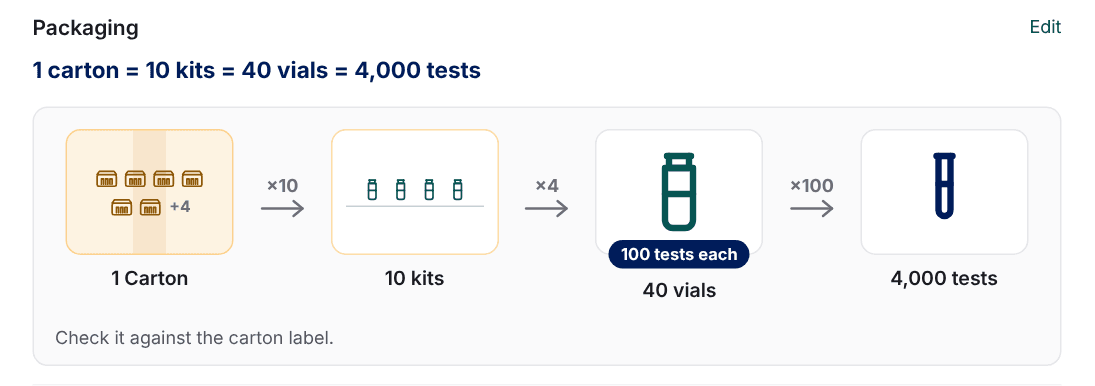

The levels: carton, pack, piece and what a piece holds
A product's packing is one chain of up to four lines. Every line except the piece is optional, and each carries the name you use for it.
| Level | Usual name | The count you enter | Example |
|---|---|---|---|
| Carton (outer) | Carton, Box or Drum | How many packs one carton holds (or pieces, when there is no pack) | A carton of 10 boxes |
| Pack (inner) | Box, Pack, Kit or Tray | How many pieces one pack holds | A kit of 4 vials |
| Piece | Piece, Vial, Bottle, Bag or Tablet | No count: it is the unit everything is counted in | One vial |
| What one piece holds | Tests, mL, mcg and so on | How much one piece holds, and in which unit | A vial of 100 tests, or a bag of 500 mL |
You type how many boxes a carton holds (10) and ProcDuck keeps the pieces per carton (1,000) for you. What one piece holds is a fourth line under the piece, not another level of packaging: it is what lets one price be read per test, per mL or per mcg. It is not the physical volume under Sizes and weights, which stays a separate fact for freight and the fit check.
Setting up a product's packing
Open the product's form (Add product, or Edit on an existing product's page) and go to the Packaging section. It sits above Pricing and terms, and it opens in Simple mode.
Choose the product type
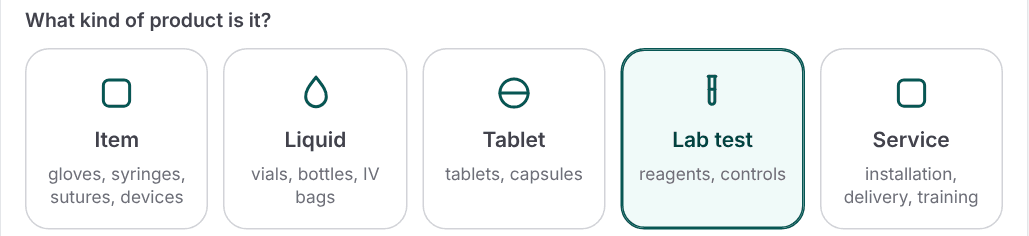
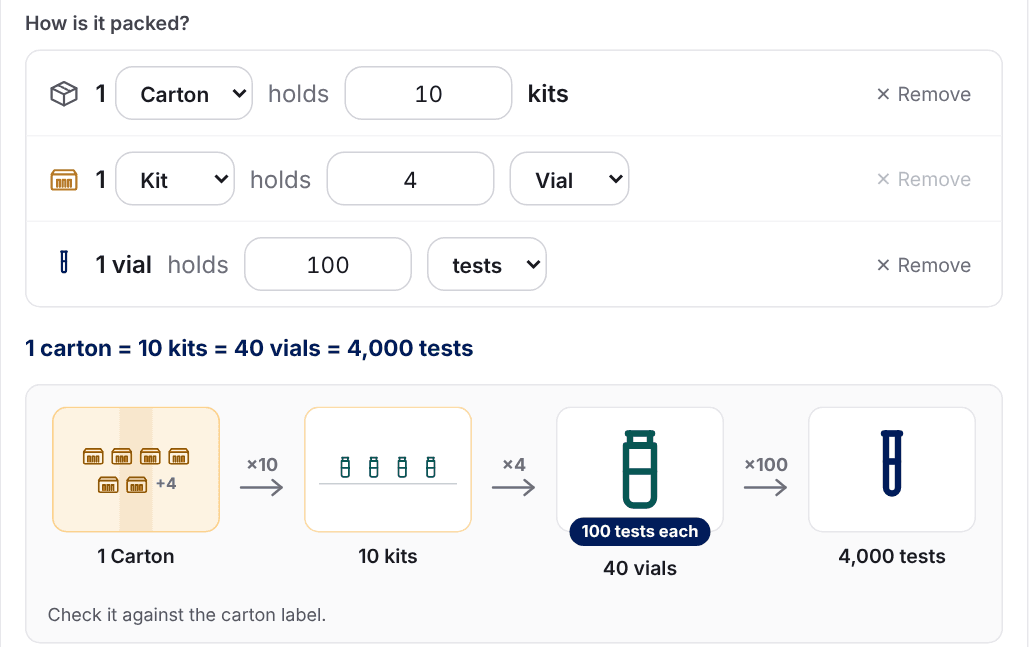
What kind of product is it? shows five cards. The type names the levels for you: a lab reagent opens as a carton of kits of vials, with a line for the tests one vial holds. A type never changes a name you typed and never writes a count, so the counts stay yours.
| Card | Covers | Opens as | Content line |
|---|---|---|---|
| Item | Gloves, syringes, sutures, dressings, devices | Carton > Box > Piece | Hidden |
| Liquid | Vials, bottles, IV bags | Carton > Box > Vial | Shown (mL) |
| Tablet | Tablets, capsules | Carton > Box > Tablet | Shown for a Strip |
| Lab test | Reagents, controls | Carton > Kit > Vial | Shown (tests) |
| Service | Installation, delivery, training | No packing | None |
Enter the counts
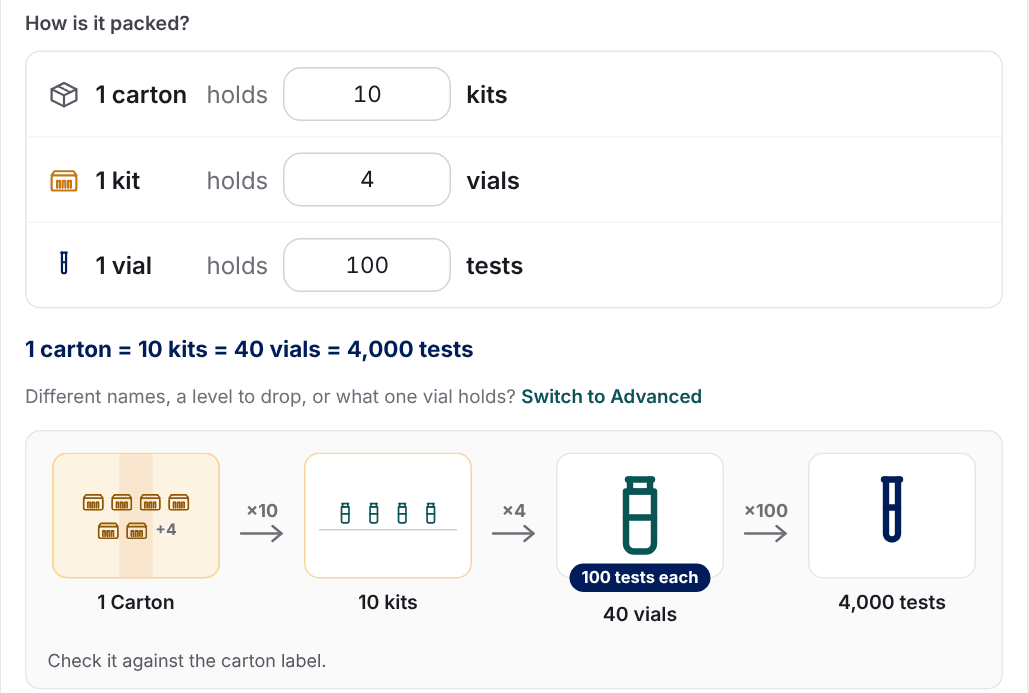
How is it packed? asks only for the counts. For a lab reagent, type how many kits a carton holds (10), how many vials a kit holds (4) and how many tests one vial holds (100). Under the counts, a sentence sums the packing up (1 carton = 10 kits = 40 vials = 4,000 tests) beside a picture of the levels drawn for the type: vials standing, gloves in a dispenser box, IV bags lying flat. What a piece holds shows as a badge on the piece (100 tests each), never as a hundred drawn shapes.
The form points out what looks wrong, in plain words under the picture:
- A missing count shows as a question: How many kits are in one carton? with an Enter it link.
- A carton that is not a whole number of boxes offers the nearest whole count.
- A pack of one piece is the piece itself, so the form offers to remove the pack level.
- A count that looks like an amount (such as 2.5 pieces in a box) is offered a move to what one piece holds.
Advanced mode: names and levels
Switch to Advanced when the cards are not enough: a level has a different name, a level should go, or a piece holds something. Advanced shows the narrower types grouped under the four cards (for reagents: Lab reagents and Controls), a name list for every level, Remove for the carton and the pack, and the content line for any type.
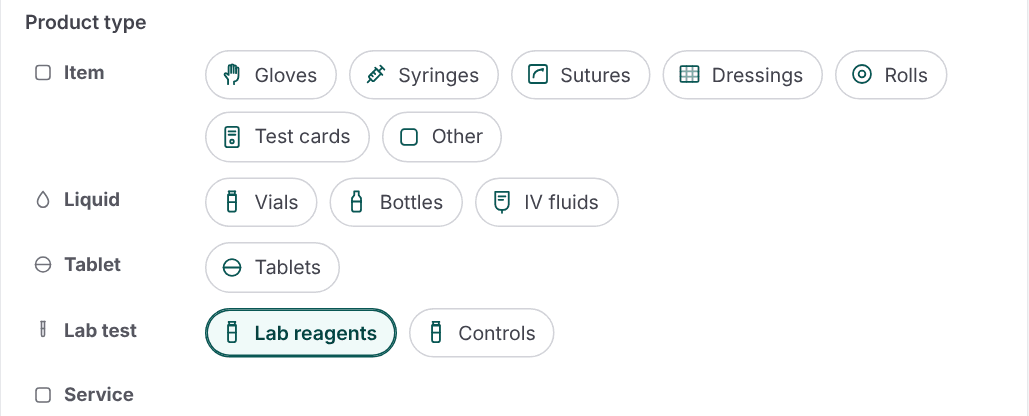
- Names. Each level's name is a list (Carton, Box, Pack, Kit, Tray, Vial, Bottle and more) with Other… for a name of your own. A name you pick from the list is written in its standard spelling, and Other… keeps your text as you typed it. A name saved earlier that the lists do not know shows as (as saved) and stays as it was.
- Levels. Remove drops the carton, the pack or the content line and clears its count, and Add an outer carton and Add an inner box or pack bring the carton and the pack back. The level your prices are stated per cannot be removed: Prices are per kit. Change Price per first.
- What one piece holds. You pick its unit from a closed list: tests, reactions, doses, tablets, capsules, mL, L, gallons, mcg, mg, g, kg, IU, units, cm and m.
- Sizes and weights (optional). The dimensions and weights of the piece, the pack and the carton, and a check that the boxes fit the carton. They are needed only for freight and the fit check, and the section opens by itself when it is filled.
Your browser remembers the mode you chose. A product whose names or levels differ from its type's defaults opens in Advanced, so nothing is hidden from you.
Services have no packing
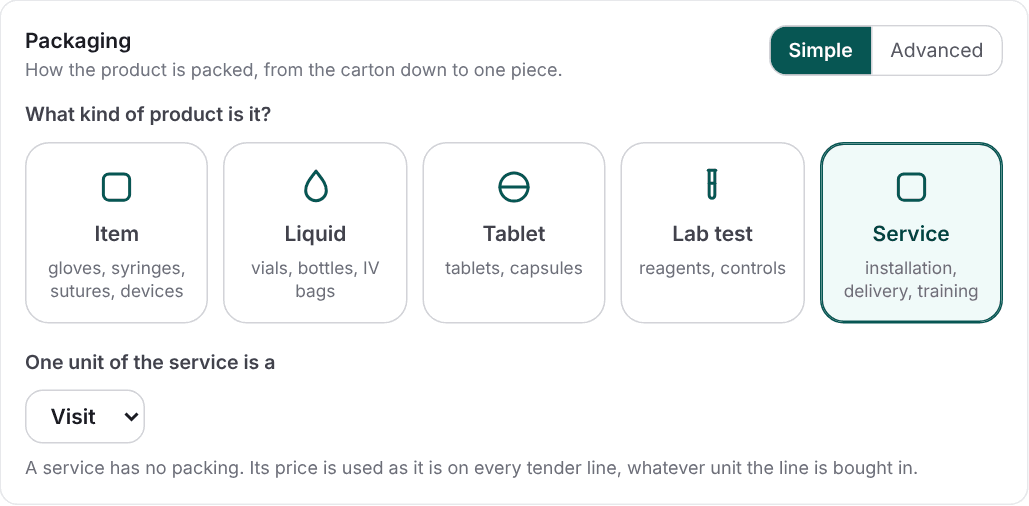
A Service (installation, delivery, training) has no packing. Choose its card, pick the unit of one service (service, job, visit, hour, day, month or lump sum) and type its price. That price is used as it is on every tender line, whatever unit the line is bought in. The form hides the medical flag, the registration facts and the country of origin, and clears them if you switch a product to a service. A priced service goes into the NUPCO response file and the attachments file, with the catalog, SFDA and MDMA slots marked not applicable rather than missing.
Check packing
The Check packing button asks a small AI model to read the product's name and the packing you entered and point out what looks wrong, such as a box count that reads like an amount. It shows up to five suggestions, each with a one-line reason, and a suggestion that names a field and a value has an Apply button that fills the form. Nothing is saved until you save. The check is for members who edit products, needs the product's name first, and says The check is not available right now when it cannot answer, without changing anything.
Price per: one price at every level
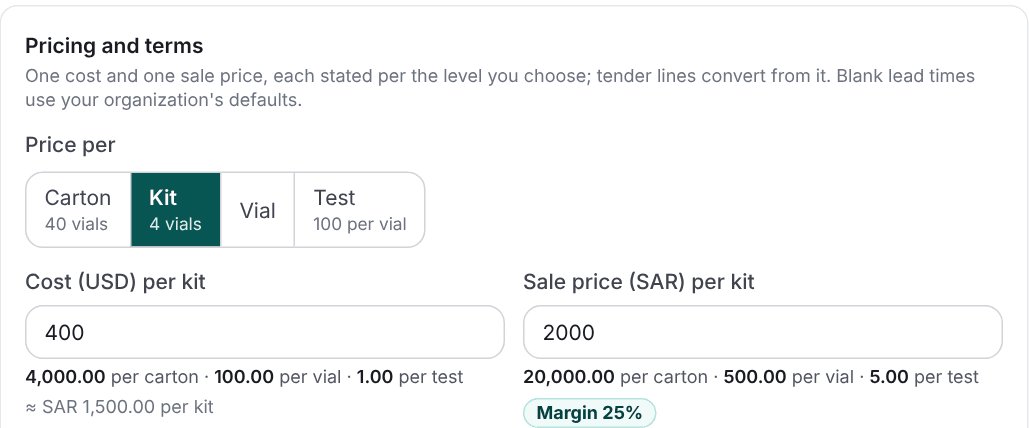
A product keeps one cost price and one sale price, each stated for the level you choose in Price per, under Pricing and terms. A new product starts at the piece. The control lists only the levels the product has, each with its count (Carton, 40 vials; Kit, 4 vials; Vial; Test, 100 per vial). A level whose count is missing shows Count needed and cannot be chosen until you enter the count.
Reading the price ladder
Under each price, the form shows what it comes to at every other level: 2,000 per kit is 20,000 per carton, 500 per vial and 5.00 per test. The cost ladder (in USD, with its SAR equivalent at the fixed 3.75 rate) only shows to roles that see cost prices. The Margin chip shows your margin on the sale price. Nothing is stored per level: only your one price is, and every other level is calculated when it is shown.
Changing Price per on a saved price
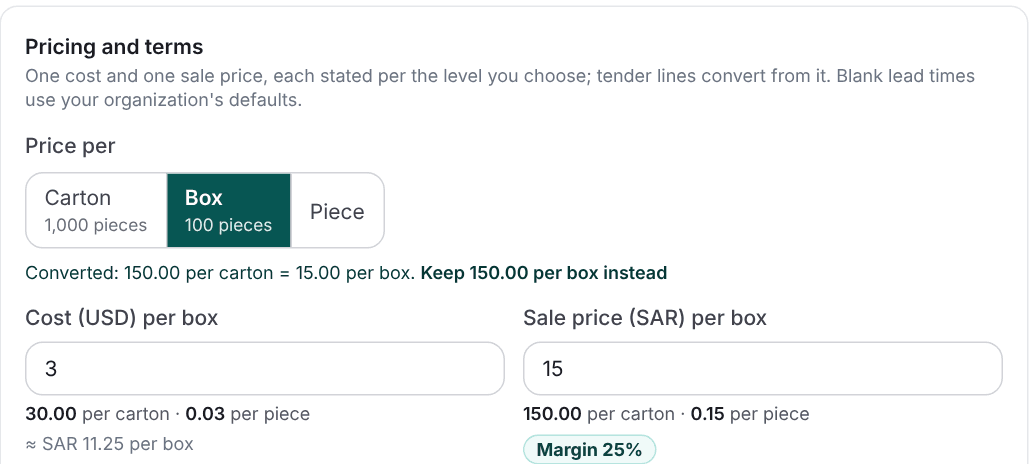
Choose another level and a saved price converts, with a line that says so: Converted: 150.00 per carton = 15.00 per box. If the number was already per box and only the label was wrong, press Keep 150.00 per box instead. A price you typed in this session is relabelled, not converted. A saved price is never relabelled silently: when the level it is stated per has no count, every other level is unavailable and the form says why. Going back to the first level restores the original numbers exactly, however many times you click. The form refuses a converted price above 9,999,999.99.
Products without Price per
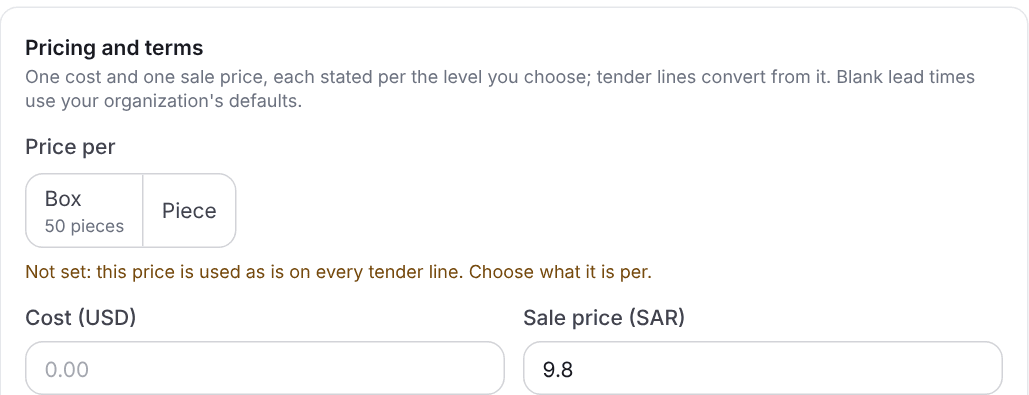
Products saved before packing levels, and products created through Bulk add or an API call that sends no level, show Not set. Their price is used as it is on every tender line, exactly as before, and nothing is converted until you choose what it is per. Choosing a level on such a product states what the numbers already meant; it does not convert them.
Tender lines: what one EA, KIT or TET means
A tender line is bought in its own unit: 50 PKT, 14,607 EA, 52,000 TET. When the product selected for the line has a Price per, a chip under the quantity says what one unit of the line is of that product, and the line's price boxes show the catalog price converted to that unit.
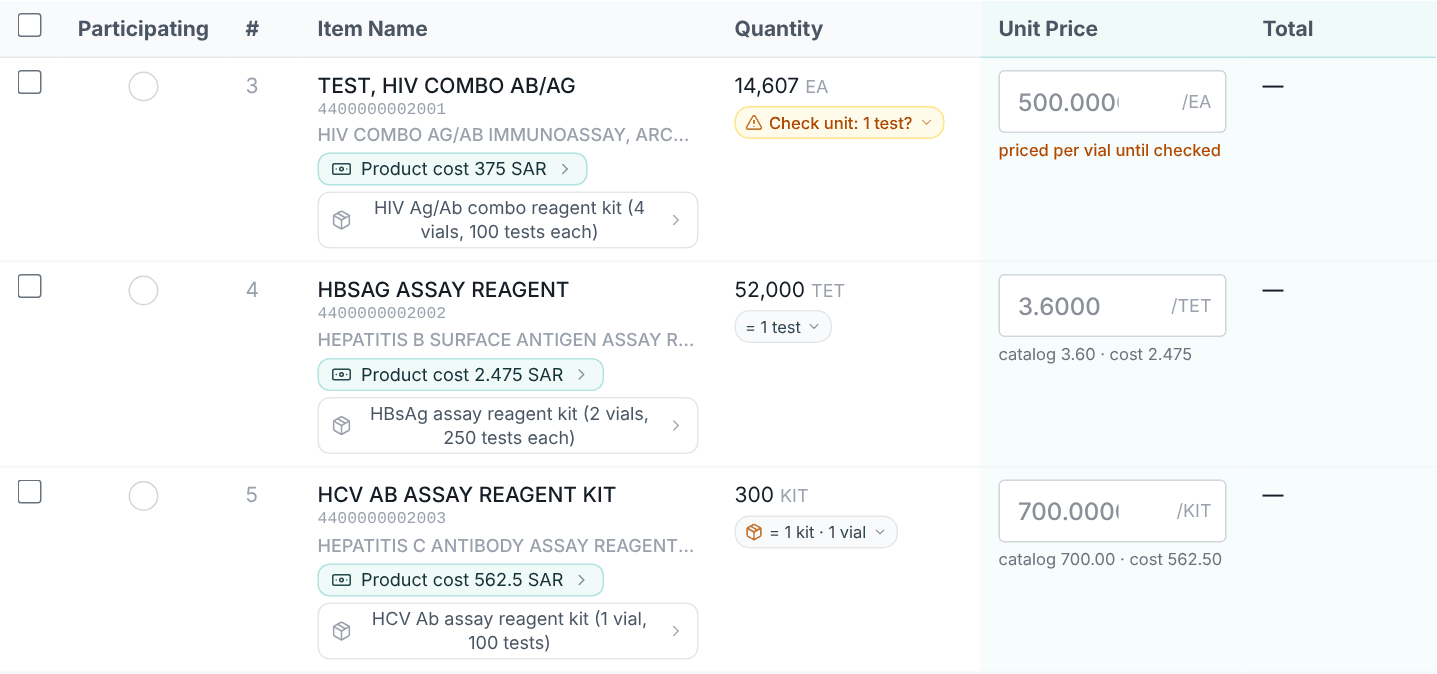
EA, a TET that is one test, and a KIT that is one kit of one vial.How the unit is read
ProcDuck reads the line's unit, its name and its description and compares them with the product's levels. The first match wins:
| Tender unit | Read as | On a reagent of vials and kits |
|---|---|---|
EA, EACH, PC | One piece of the product | One vial; the line is flagged for a check when the item's name starts with TEST, |
The name of one of the product's levels: VIA, KIT, CTN, BT | That level | VIA a vial, KIT a kit, CTN a carton |
PKT, PACK, PAC, PK, BOX on a product that has a pack | One pack | One kit (unless the description contradicts the pack count) |
CTN, CS, CASE, CARTON on a product that has a carton | One carton | 40 vials |
TET, TEST, TST on a product that counts tests | One test | One test |
ML, L, MG, MCG, KG, DOS and the like | That amount of what one piece holds, when the product holds that kind of measure | One mg of the vial's content (when it is counted in mg) |
DZ and PAA | 12 pieces (a dozen), and 2 pieces (a pair) | A dozen sutures, or a pair of gloves |
The description counts too. A line that says 100 PIECES/PACKET, PACK OF 50, 5/PK, 50 TEST/KIT or 2X50 TEST/KIT states how many pieces go in a pack. If your pack holds a different number, the line is flagged for a check instead of guessed. The full meaning of NUPCO's unit codes is in the knowledge base: What the unit codes mean on a NUPCO tender.
When the unit is unsure: Check unit
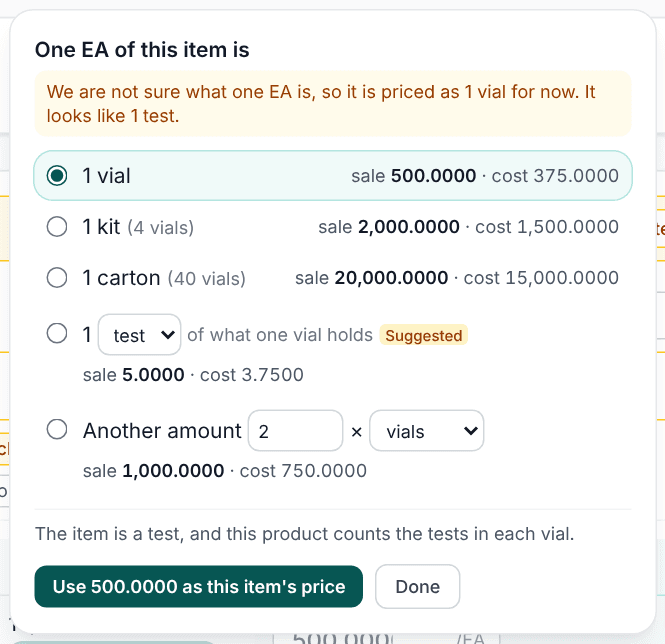
EA line named TEST, …: ProcDuck is not sure, so it prices it per vial for now, suggests the test and shows the price of every option.When ProcDuck cannot place a line's unit, the chip turns amber (Check unit, with its guess: Check unit: 1 test?) and the line is priced at one piece until you say what the unit is. Nothing is skipped for being unsure. The usual causes are a unit that could be a pack or a case, the name of a piece other than your product's, a measure of another kind than what one piece holds, a unit it does not know, no unit at all, a line named TEST, … carrying the generic EA, and a description whose stated count disagrees with your pack.
Click the chip to open One EA of this item is and choose one of the product's levels (here 1 vial, 1 kit or 1 carton), Another amount, or an amount of what one piece holds (here 1 test). Each option shows the sale price and cost it turns into, and the word Suggested marks what ProcDuck thinks it is. Use 500.0000 as this item's price saves the price shown for the chosen unit (it needs the right to price bids), and Done closes the window. Once you have set a unit by hand, Back to automatic returns the line to automatic matching.
Setting units for many lines
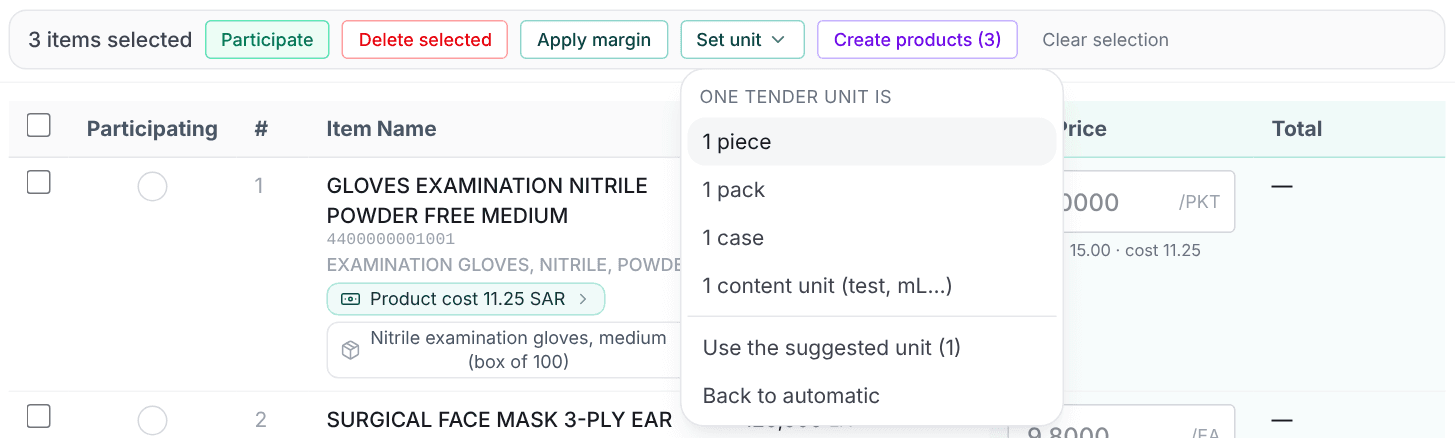
The Unit to check filter in the Items card lists the lines whose unit is unsure. Select lines and use Set unit in the selection bar: One tender unit is 1 piece, 1 pack, 1 case or 1 content unit (test, mL…), Use the suggested unit (n) to give each line its own suggestion, or Back to automatic. A message tells you how many lines were set and why the others kept their unit: no product selected for the line, no count for that level on the product, the product changed meanwhile, or the line is no longer on the tender.
Price from catalog and pricing by margin
Both tools read the product's one price and convert it to each line's own unit, so you never divide by hand. Price from catalog (in the Actions menu, for the working roles that see bid pricing) gives each item the sale price of its catalog product and marks it as participating.
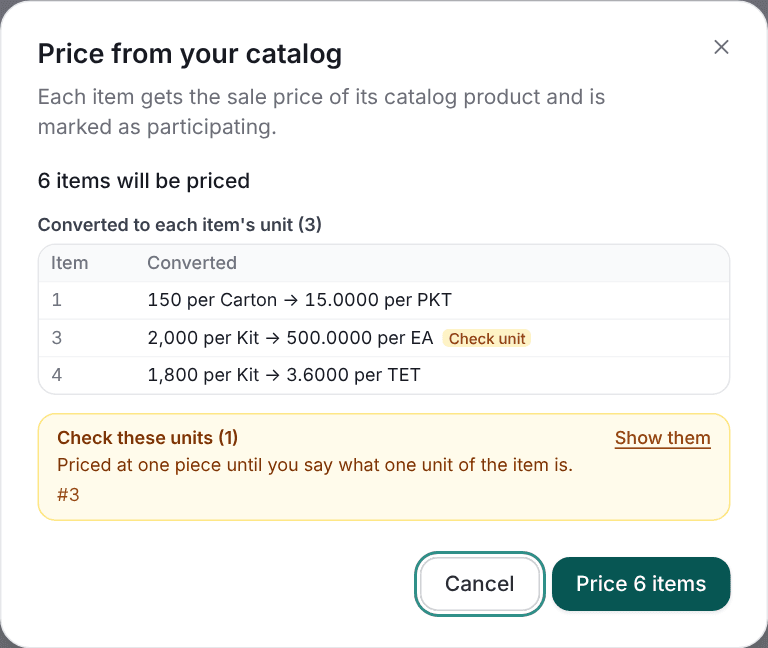
- Which product prices a line. The product already selected for the line; else the only product linked to the item's NUPCO code; else the code's default product; else the lowest sale price among the code's products, unless the owner turned that off in organization settings. When it compares products, it compares the converted prices, so a cheaper price per piece never beats the right price per pack. Otherwise the line is left alone and listed.
- A chosen product without a sale price is reported, never swapped for another one.
- Lines that already have a price keep it, unless you tick Also replace the price already entered.
- Lines that cannot be priced are listed with the reason: several products and no default, the product has no sale price, no catalog product, a packing count is missing, or the price rounds to 0 at the line's unit.
- Lines on Check unit are still priced, at one piece, and listed under Check these units, with Show them applying the Unit to check filter.
Pricing by margin on the converted cost
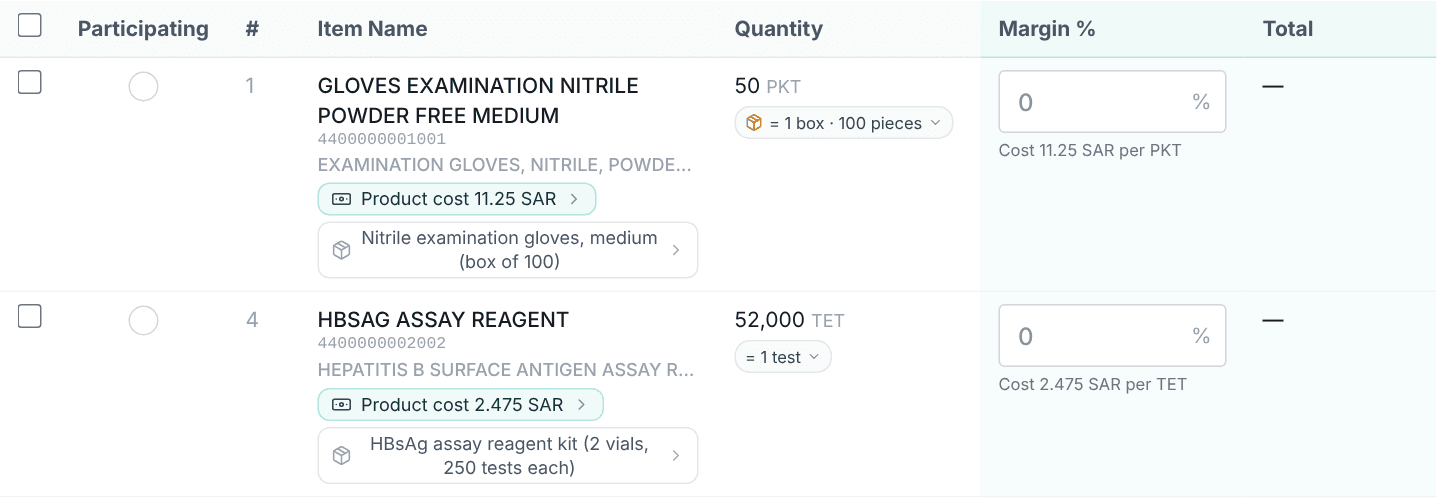
In Margin % mode each line's box takes a percentage, and the price is built on the cost of the selected product converted to the line's unit (Cost 2.475 SAR per TET). The margin is a share of the selling price: price = cost ÷ (1 − margin). The box is disabled, with the reason, when the cost cannot be converted (The selected product's cost can't be converted to this item's unit, meaning a packing count is missing) or when the price would round to 0. The full rules are in Pricing by margin.
A typical flow
- Link each item to a product from the item's Products panel (see Linking an item to a product).
- Run Price from catalog and read the conversions.
- Open the Unit to check filter.
- Select those lines, choose Set unit, then Use the suggested unit (or open each chip and choose the unit you want).
- Run Price from catalog again with the replace option ticked, so each checked line takes its right price.
- Review the totals, then generate the bid files: Bid pricing and The bid files.
Worked examples
Each table starts from one price and shows the price for every tender unit. Prices are SAR, rounded once to four decimals.
A lab reagent: priced per kit
A carton of 10 kits, a kit of 4 vials, a vial of 100 tests. The price is SAR 2,000 per kit.
| Tender unit | One unit is | Price |
|---|---|---|
TET | One test | 5.0000 |
VIA | One vial | 500.0000 |
KIT | One kit | 2,000.0000 |
CTN | One carton (40 vials) | 20,000.0000 |
Gloves: priced per carton
A carton of 10 boxes, a box of 100 gloves. The price is SAR 150 per carton.
| Tender unit | One unit is | Price |
|---|---|---|
EA or PC | One glove | 0.1500 |
PKT | One box of 100 | 15.0000 |
CTN | One carton | 150.0000 |
PAA | A pair (2 gloves) | 0.3000 |
DZ | A dozen (12 gloves) | 1.8000 |
A lab control: priced per vial, sold per mg
A box of 10 vials, each vial holding 100 mcg. The price is SAR 1,200 per vial.
| Tender unit | One unit is | Price |
|---|---|---|
VIA | One vial | 1,200.0000 |
BOX | One box (10 vials) | 12,000.0000 |
MCG | One mcg | 12.0000 |
MG | One mg | 12,000.0000 |
ML | One mL | Cannot convert: a mass is not a volume |
An IV fluid: priced per bag
A bag holding 500 mL, 20 bags to a carton. The price is SAR 4.50 per bag.
| Tender unit | One unit is | Price |
|---|---|---|
BAG | One bag | 4.5000 |
L | One litre | 9.0000 |
CTN | One carton (20 bags) | 90.0000 |
ML | One mL | 0.0090 |
Sutures: priced per box of 12
A box of 12 sutures. The price is SAR 300 per box.
| Tender unit | One unit is | Price |
|---|---|---|
DZ | A dozen (12 sutures) | 300.0000 |
EA | One suture | 25.0000 |
Quotations, orders and invoices
On a line you build by hand in a quotation, a sales or purchase order or an invoice, picking a product whose Price per is set fills the line's unit with the name of that level (Carton, Box, Kit, Vial, Test, mL) and its price with the stored price, unchanged: 150 per carton is one carton at 150. A product with no level keeps the earlier prefill, the piece name and the price as they were. An invoice line also takes the level's standard unit code where the form offers one (for example BX for a box), and PCE otherwise. Quotations generated from a tender are not affected: they read the bid price, which is already per the tender's unit.
Importing and exporting packing
The product template, the Excel import and the catalog export carry the packing columns:
| Column | What goes in it | Example |
|---|---|---|
Price per | The price level: Unit, Piece or Each; Pack or Box; Case or Carton; Content; the same words in Arabic; or the name of one of the row's own levels | Kit |
Unit of measure | The name of the piece | Vial |
Package type and Package size | The pack's name and the pieces in it | Kit and 4 |
Case type and Units per case | The carton's name (empty means Carton) and the pieces in it, not the packs | Carton and 40 |
Content per unit and Content unit | What one piece holds and its unit (both or neither) | 100 and test |
Product kind | The product type: Item, Liquid, Tablet, Lab test or Service, or a narrower type such as Lab reagents | Lab reagents |
A Price per cell that names no level of its row, or a level the row has no count for, drops that row's prices with the issue listed: a price without its level is not stored as if it were per piece. A blank cell leaves the level not set. The catalog export writes the level's name, so an exported file imports back with the same level. The Bulk add sheet has no level column, so its rows start not set. The import steps are in Import from Excel.
Who sees and changes what
- Editing a product's packing and prices: owner, admin, sales and purchasing.
- The cost ladder and cost prices: the roles that see cost prices, meaning owner, admin, purchasing and viewer. They are withheld from sales, technical and viewer without pricing, by the server and not only on screen.
- Changing a saved product's Price per: a member who edits products and sees both prices, because the change converts both.
- The chip and Set unit: the working roles (owner, admin, sales and purchasing). Price from catalog and Use … as this item's price also need a role that sees bid pricing.
- Pricing by margin: the roles that see cost prices, because the resulting price gives the cost away.
From the API and MCP
Everything above is on the API and the MCP server. A product's packing and level are fields, a tender line's unit is set by a batch tool, and the pricing tools convert. The full references are in the MCP tool pages: Creating and changing products and Linking items to products.
| Field or tool | What it does |
|---|---|
price_basis | The level cost_price and sale_price_sar are stated per: unit, pack, case or content. Omit it and the price is used as it is on every line. Send it with every price. |
reprice | With a change of a stated price_basis on a priced product: convert restates the saved prices at the new level, keep keeps the numbers. |
unit_of_measure, package_type, package_size, case_type, units_per_case | The names and counts of the piece, the pack and the carton. package_size counts pieces per pack and units_per_case pieces per carton, not packs. |
content_quantity and content_unit | What one piece holds. Send both or neither. |
packing_kind | The product type: a category (item, liquid, tablet, lab_test or service) or a narrower kind such as lab_reagent. |
tender_item_price_levels_set | Sets what one tender unit is for up to 500 lines in one call. Not on the lite server. |
tender_item_product_selection_set | Selecting a product also takes price_level, price_level_count and price_level_measure. |
tenders_product_links_list | Returns each line's level, its status (set, matched or check), the reason and the suggestion, and the sale price and cost per tender unit. |
tenders_catalog_pricing | Price from catalog with conversion. Its report lists the converted lines and the lines on check. |
A write the packing cannot support is refused with a 400 that writes nothing, and the message names the field and the way out: price_basis_level_missing when the stated level's count is empty, content_incomplete when one of content_quantity and content_unit comes without the other, reprice_required when a stated level changes on a product with a saved price you do not resend, and converted_price_out_of_range when a converted price would pass 9,999,999.99.
Questions lab suppliers ask
What is the difference between a kit, a vial and a test?
A test is one determination. A vial holds a number of tests (100 in the example above). A kit packs several vials (4), and a carton packs several kits (10). ProcDuck keeps those counts on the product so that one price converts to any of them.
How do I price a reagent per test when my price list is per kit?
Set Price per to Kit and enter the kit price. ProcDuck does the division: SAR 2,000 for a kit of 4 vials of 100 tests is 2,000 ÷ 400 = 5.00 per test. On a tender line in TET, Price from catalog writes 5.0000.
The tender says EA, but the item is a test. What do I do?
EA means "each", and on a line named TEST, … it usually stands for one test. ProcDuck does not assume: the line shows Check unit: 1 test? and is priced per vial until you confirm. Open the chip and choose 1 test, or select the lines and use Set unit then Use the suggested unit, and run Price from catalog again with the replace option ticked.
Why does the same material code use different units in different tenders?
Because the unit belongs to the tender line, not to the product. A code can be one test in one tender (TET) and one piece or one pack in another. That is why ProcDuck keeps the unit on the tender line and converts your one price to it each time.
What happens if I do not set Price per?
Nothing changes: the product's price is used as it is on every tender line, as before. Conversion starts only once you say what the price is per.
Can I price per mL, per mcg or per dose?
Yes, when the product states what one piece holds in a unit of the same kind. Mass converts to mass (mcg, mg, g, kg), volume to volume (mL, L, gallons) and length to length (cm, m). Tests, reactions, doses, IU, units, tablets and capsules convert only to themselves, and a mass never converts to a volume.
How many decimals does a bid price have?
Four, the format of NUPCO's own 0.0000. A converted price is rounded once, to four decimals, and a price that rounds to 0.0000 is refused. A cost stays unrounded until it becomes a price.
Does changing a unit or Price per change my saved bid prices?
No. A saved bid price is SAR per the tender's unit and stays as it was saved. Changing a line's unit changes what the next pricing run writes, and the cost, margin and totals the page shows. Changing a product's Price per converts the product's own prices and nothing else.